
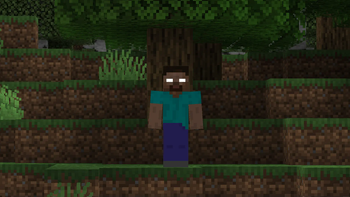
Cave Horror Project quick answer
For most new players, Cave Horror Project 1 is the easier starting point because it uses Minecraft 1.20.1, has the newer active release line, and is presented as a streamlined horror experience that is easier to learn and run. Cave Horror Project 2 is the heavier 1.19.2 branch, with more survival systems, larger progression changes, and a stronger expectation that players will manage a full modpack rather than a small collection of scary mods.
The phrase “the cave horror Minecraft mod” often leads to this series, but Cave Horror Project is a modpack, not one standalone creature mod. That distinction matters: a modpack controls the exact mods, configs, resource packs, scripts, and performance settings that create the intended experience. Installing only one included mod will not reproduce the same encounters or pacing.
| Choice | Current verified release | Minecraft / loader | Best fit |
|---|---|---|---|
| Cave Horror Project 1 | v3.4.1 — June 4/8, 2026 | Minecraft 1.20.1 / Forge | New players, smoother onboarding, modern base version |
| Cave Horror Project 2 | v1.5.2 — June 13/15, 2026 | Minecraft 1.19.2 / Forge | Heavier survival, more systems, experienced modpack players |
What Cave Horror Project actually includes
Cave Horror Project combines exploration, darkness, hostile entities, ambient events, changed cave behavior, survival friction, and progression rules into one curated profile. Its goal is not constant jumpscares. The stronger moments come from uncertainty: hearing something without seeing it, entering a cave with limited visibility, losing a safe route, or realizing that a familiar Minecraft system behaves differently.
Because the pack is curated, its config files are part of the product. Difficulty, spawn frequency, sound behavior, recipes, structures, and compatibility choices can all be changed by those files. A launcher import preserves that configuration more reliably than manually copying individual JAR files into an existing profile.
Current versions and official download sources
As of July 20, 2026, the latest verified Cave Horror Project 1 release is v3.4.1 for Minecraft 1.20.1 and Forge. Modrinth lists its MRPACK at about 190 MiB, while CurseForge provides its own launcher package and file history. The latest verified Cave Horror Project 2 release is v1.5.2 for Minecraft 1.19.2 and Forge; its Modrinth MRPACK is about 296 MiB. Package sizes differ between platforms because the archive format and included metadata are not identical.
Use the official project page or launcher import flow instead of an unrelated mirror. Verify JustErikSK on CurseForge or mustardsean2 on Modrinth, plus the exact project title, Minecraft version, Forge loader, publication date, changelog, and final file. A ZIP, EXE, or universal mirror that does not match the official record should not be treated as the modpack.
- CHP 1 CurseForge: cave-horror-project · Modrinth: cave-horror-project-modpack
- CHP 2 CurseForge: cave-horror-project-forge-1-19-2 · Modrinth: cave-horror-project-1-19-2
- CHP 1 requires a dedicated Minecraft 1.20.1 Forge instance
- CHP 2 requires a dedicated Minecraft 1.19.2 Forge instance
- Keep each pack in its own launcher profile and preserve its config folder
Cave Horror Project 1 vs 2: the practical differences
CHP 1 is positioned as a simpler and more optimized entry point. It is the better choice when you want the core cave-horror loop, easier setup, and a current Minecraft 1.20.1 base without learning every survival subsystem at once. The active release line also makes it the safer default for a fresh install.
CHP 2 is not simply a newer sequel. It is a different branch built on Minecraft 1.19.2, and the author describes it as the more complex experience. Choose it when deeper survival pressure, expanded content, and a longer learning curve are benefits rather than obstacles. Do not copy a CHP 2 world into CHP 1 or switch the pack version underneath an important save without a backup.
| Decision factor | CHP 1 | CHP 2 |
|---|---|---|
| Minecraft base | 1.20.1 | 1.19.2 |
| Loader | Forge | Forge |
| Complexity | More approachable | More systems and progression |
| Recommended first install | Yes | Only if you prefer a denser pack |
| World migration | Use CHP 1 worlds only | Use CHP 2 worlds only |
| Server setup | Match v3.4.1 files and configs | Match v1.5.2 files and configs |
How to install Cave Horror Project safely
A launcher import is the most reliable installation method because it creates the correct game version, Forge profile, mod list, and configuration together. Give the pack a clean instance rather than reusing a general modded profile.
- 1
Choose CHP 1 or CHP 2
Confirm whether you want Minecraft 1.20.1 or 1.19.2 before downloading. The two packs are separate.
- 2
Open the official CurseForge or Modrinth page
Match the author, project slug, release number, loader, and Minecraft version.
- 3
Import the project in a supported launcher
Let the launcher create a new instance and download the referenced dependencies.
- 4
Allocate reasonable memory
Start with the project guidance and your system limits; avoid assigning nearly all system RAM to Java.
- 5
Launch once before adding anything
Create a test world and confirm menus, resources, audio, and cave generation load correctly.
- 6
Back up before updates
Copy the instance and important worlds before moving to a newer pack release.
Multiplayer and server preparation
Cave Horror Project can be played with friends, but every client and the server must use the same pack branch, release, Forge version, mod list, and configuration. “Almost the same” is not enough: one changed dependency or server-side config can cause connection errors, missing registries, different spawns, or worlds that behave differently for each player.
Build the server from a clean export or the project’s supported server method. Test with a temporary world before moving an established save. Voice chat can improve coordination and tension, but it is optional and should be added only when its Minecraft version and loader match the selected pack.
Common installation and performance problems
A crash during startup usually points to a wrong Java runtime, insufficient memory, a damaged download, an unsupported launcher import, or extra mods that changed the curated dependency graph. Read the first meaningful error in the log instead of assuming the last line names the cause. Test the untouched pack before adding shaders, optimization mods, voice chat, or client utilities.
Low frame rate can come from entity activity, particles, dynamic lighting, shaders, resource packs, view distance, or insufficient CPU performance. Lower one setting at a time and retest the same area. Removing random mods may make the instance launch while silently breaking scripts, recipes, structures, or progression.
- Do not put CHP 1 and CHP 2 in the same mods folder
- Do not update included mods individually unless the project instructions allow it
- Use the correct Java runtime for the selected Minecraft version
- Confirm client and server configs are identical
- Back up worlds before changing pack releases
- Report reproducible issues with logs, pack version, launcher, and hardware details
Which Cave Horror Project should you play?
Choose Cave Horror Project 1 if you want the best general starting point, Minecraft 1.20.1, easier setup, and the most approachable version of the series. Choose Cave Horror Project 2 if you deliberately want the older 1.19.2 base, greater complexity, and a more demanding long-form survival profile.
Whichever branch you choose, treat it as a complete modpack. Install from an official project page, keep a clean profile, match the exact version in multiplayer, and back up before updates. If you only want to compare scare styles before committing to a large pack, start with our broader Minecraft horror mod comparison and then return to this version guide.
Cave Horror Project FAQ
Is Cave Horror Project a mod or a modpack?
It is a curated Minecraft horror modpack. It combines multiple mods, configuration files, resources, and progression choices, so importing the full pack is different from installing one JAR.
What is the latest Cave Horror Project 1 version?
The latest version verified on July 20, 2026 is CHP 1 v3.4.1 for Minecraft 1.20.1 with Forge. CurseForge published it June 4 and Modrinth published its package June 8, 2026.
What is the latest Cave Horror Project 2 version?
The latest version verified on July 20, 2026 is CHP 2 v1.5.2 for Minecraft 1.19.2 with Forge. CurseForge published it June 13 and Modrinth published its package June 15, 2026.
Can I install Cave Horror Project 1 and 2 together?
No. Keep them in separate launcher instances. They use different Minecraft versions, different mod lists, and different configurations.
Can Cave Horror Project run on a server?
Yes, but all clients and the server must match the same pack branch, release, Forge build, mods, and configs. Test a clean temporary world first.
Where should I download Cave Horror Project?
Use the official CurseForge page published by JustErikSK or the official Modrinth project by mustardsean2. Verify the slug, version, Minecraft release, Forge loader, date, and changelog.
Can I add more mods to Cave Horror Project 1?
You can experiment in a copied instance, but extra mods can change dependencies, configs, recipes, spawns, performance, or server compatibility. Test one addition at a time and keep the original profile and world backup.
Does sleeping work normally in Cave Horror Project?
Sleep behavior can change with the pack branch, included mods, and current configs. Check the current release notes and test a new world instead of assuming vanilla sleep rules apply to every version.
Official project sources
- Cave Horror Project 1 on CurseForgeOfficial project page, file history, author and current release.
- Cave Horror Project 1 on ModrinthOfficial description, versions, gallery and MRPACK metadata.
- Cave Horror Project 2 on CurseForgeOfficial CHP 2 project page and current 1.19.2 release.
- Cave Horror Project 2 on ModrinthOfficial CHP 2 version and downloadable MRPACK metadata.